Sunflower 3D SVG Multilayer File
There is a distinct satisfaction in transforming flat materials into dimensional art. The Sunflower 3D SVG Multilayer Cutting File offers crafters and designers a sophisticated way to achieve this depth without requiring advanced sculpting skills. By leveraging the precision of modern cutting technology, this design allows you to build a vibrant, textured piece that captures the organic complexity of nature. Whether you are decorating a living space, creating a heartfelt gift, or developing a product line for a small business, this multilayered approach adds a professional finish that stands out in a crowded market.
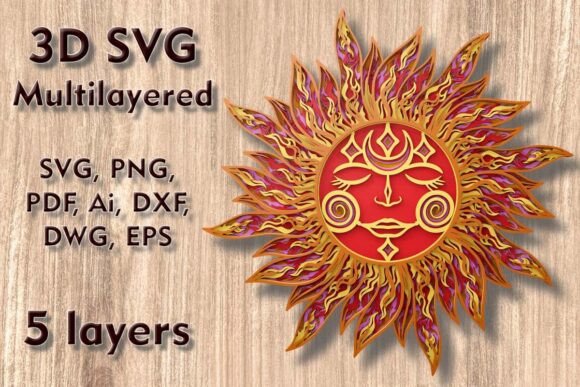
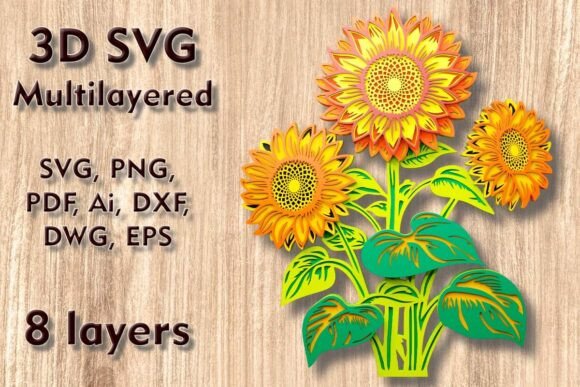
The appeal of this specific design lies in its balance between intricacy and manageability. Comprising eight separate layers, the file provides enough depth to create significant shadow play and visual interest, yet it remains structured enough to assemble without frustration. The central motif, often described as a Sunflower Mandala, merges the cheerful familiarity of a sunflower with the geometric symmetry of mandala art. This combination makes it versatile enough for various interior styles, from bohemian chic to modern farmhouse.
Understanding the Design Specifications
Before beginning any project, understanding the technical constraints and possibilities of your digital file is crucial. This Sunflower 3D SVG Multilayer Cutting File comes with a default size of 300mm height by 250mm width (approximately 11.82 x 9.84 inches). This dimension is ideal for standard wall decor, offering a substantial presence without overwhelming smaller rooms. However, one of the greatest advantages of vector-based files is scalability.
You can easily increase the size of the design to create a statement piece for a large hallway or living room. When scaling up, the structural integrity of the layers generally improves, as the connections between elements become more robust. Conversely, if you need to reduce the design for smaller applications like greeting cards or jewelry boxes, you must proceed with caution. The design includes thin elements that define the petals and intricate details. Reducing the overall size too much can make these delicate parts fragile or impossible to weed and assemble. Always check the smallest details in your preview software before committing to a cut, especially when working with materials that may fray or tear, such as paper or thin cardstock.
Material Selection and Machine Compatibility
The versatility of this file is evident in its compatibility with a wide range of materials and machines. Whether you own a Cricut, Silhouette, Glowforge, or a professional CNC router, this design is tailored to work seamlessly with your equipment. The choice of material dramatically alters the final aesthetic and functionality of the piece.
- Plywood and Wood: Using 3mm plywood or basswood creates a rustic, warm look. The natural grain adds character to each layer, and the thickness provides excellent depth. This is ideal for permanent home decor.
- Cardstock and Paper: For a softer, more colorful approach, high-quality cardstock is perfect. You can use gradient colors, transitioning from deep browns and oranges in the center to bright yellows on the outer petals. This method is cost-effective and great for practicing assembly techniques.
- Acrylic: Cutting layers from colored acrylic sheets results in a modern, glossy finish. This material reflects light beautifully and is durable, making it suitable for high-traffic areas or commercial displays.
- MDF and Cardboard: These are economical options for prototyping or painting. MDF provides a smooth surface that takes paint well, allowing you to customize the color scheme entirely.
- Aluminum: For an industrial edge, thin aluminum sheets can be cut using laser or CNC machines. This creates a sleek, metallic artwork that fits contemporary interiors.
When purchasing, you receive a comprehensive ZIP folder containing SVG, layered SVG, DXF, DWG, EPS, AI, PNG, and PDF formats. This ensures that regardless of your preferred software—be it Adobe Illustrator, CorelDRAW, Inkscape, or proprietary machine software—you have the correct file type for optimal performance.
Creative Applications and Project Ideas
The Sunflower 3D SVG Multilayer Cutting File is not limited to a single type of project. Its modular nature allows for creative adaptation across various mediums. Here are several ways to utilize this design effectively:
Wall Art and Home Decor
The most common application is framed wall art. To enhance the 3D effect, use foam tape or small wooden spacers between each layer. This creates shadows that accentuate the contours of the sunflower petals. Consider mounting the finished piece in a deep shadow box frame to protect the delicate layers while showcasing the depth. For a cohesive look, match the frame color to the darkest layer of the design, anchoring the piece visually.
Greeting Cards and Invitations
By scaling down the design and using fewer layers—perhaps just the top three or four—you can create elegant, textured greeting cards. This is particularly effective for birthdays, anniversaries, or thank-you notes. Use heavy-weight cardstock to ensure the card holds its shape. The tactile nature of the layered paper adds a personal touch that digital prints cannot replicate.
Lampshades and Lighting Fixtures
For a more ambitious project, consider integrating the design into a lighting fixture. When backlit, the layered cuts cast intricate shadows on the surrounding walls. Use translucent materials like vellum or thin acrylic to diffuse the light softly. This turns the sunflower into a functional light source, adding warmth and ambiance to a bedroom or reading nook.
Commercial and Event Decor
Small business owners can use this design for event signage or retail displays. Large-scale versions made from lightweight foam board or corrugated plastic can serve as photo backdrops for weddings or seasonal events. The sunflower theme is universally appealing and works well for summer parties, harvest festivals, or bridal showers.
Assembly Tips for Professional Results
Creating a polished final product requires careful assembly. Start by organizing your layers numerically. Most layered SVG files are labeled to indicate the stacking order. Lay out all pieces before applying any adhesive to ensure you have cut every part correctly. Dry-fit the layers to check alignment; this step saves time and prevents mistakes once glue is applied.
Use a strong, fast-drying adhesive suitable for your chosen material. For wood and acrylic, epoxy or super glue works best. For paper and cardstock, a precision glue pen or double-sided foam tape provides clean bonds without warping the material. Apply pressure evenly across each layer and allow sufficient drying time between steps. Patience during assembly ensures that the layers remain aligned and the final piece looks crisp and intentional.
Keep your workspace clean and organized. Dust and debris can interfere with adhesion, especially when working with laser-cut wood that may have soot residue. Wiping down layers with a slightly damp cloth before assembly can improve the bond quality and overall appearance.
Maximizing Value for Creators and Entrepreneurs
For freelancers and entrepreneurs, the Sunflower 3D SVG Multilayer Cutting File represents a valuable asset in your digital library. It allows for rapid prototyping and production of high-margin items. Because the file is scalable and adaptable, you can offer customization services to clients, such as changing colors to match brand identities or interior palettes. This flexibility increases the perceived value of your offerings and distinguishes your work from mass-produced decor.
Educators can also benefit from this design by using it to teach principles of geometry, symmetry, and spatial reasoning. Students can engage in the process of scaling, material selection, and assembly, gaining hands-on experience with digital fabrication tools. It serves as an excellent bridge between digital design and physical creation.
Ultimately, this file is more than just a pattern; it is a tool for creative expression. By understanding its technical nuances and exploring diverse applications, you can unlock its full potential. Whether you are crafting for personal joy or professional growth, the Sunflower 3D SVG Multilayer Cutting File provides the structure and inspiration needed to create something truly remarkable.